Main objects
As previously introduced in the Quickstart section, the main objects
used in this code are classes instances. Those are defined in the vlf4ions.class_definition
module or the vlf4ions.forecast_nowcast module, depending if there are local objects
(e.g. a receiver, a transmetter, an alert), or global procedures
(e.g. a forecast, a nowcast).
Receiver
The VLF receiver used should be defined by
the vlf4ions.class_definition.receiver class. Each transmitter needs
five parameters:
a
name, which will appear in email alerts (Defining email alerts)the lattitude and longitude (
latandlon), which will appear in plots (Plotting the results)a
thresholdparameter, which is the minimum amplitude below which we consider that a station is not transmitting (default: 0.5)nb_erroris the number of consecutive times there was an error to read the data. If this number becomes too large, an alert email is sent (see theupdate_breakpoint()method below). This parameter is initialized to zero and updated as needed.
An additional parameter can be inputted if the receiver doesn’t use the same file names convention as an AWESOME instrument (see note in Reading files)
Station
Each station followed by the receiver should be an instance of the vlf4ions.class_definition.station class. They countain important information about the receiver, as well as the main method that will be applied.
Below is a table with the main transmitters.
Call-sign |
Frequency |
Power |
Latitude |
Longitude |
Country |
|---|---|---|---|---|---|
VTX |
18.2 kHz |
+8.4° |
+77.8° |
India |
|
GVT |
19.56 kHz |
60 kW |
+54.9° |
-3.3° |
UK |
NWC |
19.8 kHz |
1000 kW |
-21.8° |
+114.1° |
Australia |
NPM |
21.4 kHz |
566 kW |
+21.4° |
-158.1° |
Hawaii (USA) |
GQD |
22.1 kHz |
+54.7° |
-2.9° |
UK |
|
DHO |
23.4 kHz |
800 kW |
+53.1° |
+7.6° |
Germany |
NAA |
24 kHz |
1000 kW |
+44.6° |
-67.3° |
USA |
NLK |
24.8 kHz |
+48.2° |
-121.9° |
USA |
|
NML |
25.2 kHz |
500 kW |
+46.4° |
-98.3° |
USA |
TBB |
26.7 kHz |
+37.4° |
+27.3° |
Turkey |
|
NEGEV |
29.7 kHz |
+31.9° |
+35.1° |
Israël |
|
NRK |
37.5 kHz |
100 kW |
+63.9° |
-22.5° |
Island |
NAU |
40.75 kHz |
100 kW |
+18.4° |
-67.2° |
Puerto Rico |
NSY |
45.9 kHz |
250 kW |
+37.1° |
+14.4° |
Italy |
Attributes
Each instance of the class needs:
The
nameof the station (for reference to files, and present in email alerts). They must match the ones that are given to the antenna, and that are present in the VLF files’ names.Its lattitude/longitude (
latandlon) for the plotsIts
frequencyA
detection threshold; this is the slope above which we decide that a flare has been detected. It should have been computed before running the script for the first time, for example by taking the 75th quantile of all the slopes found in quiet timesreading-time, which is the time (in seconds after the minute) at which the data for this station is read. It should be inputted as a string (e.g.':00')
Four optional parameters can also be inputted:
the
deltaparameter (see Breakpoints detection). Its default value is 0.1, as this was found to be the optimal value when testing the algorithm on one year of data from the Nançay receiver with the NRK station. Similarly, thetime_averageparameter represents the time resolution of the data and the frequency at which it is read. It is set to 60s.the
Cal_NSandCal_EWparameters, which are the calibration number in each orientations. The defaults are0.14and0.08, which are the calibration numbers at Nançay for some stations. Each calibration number will depend on the frequency, so in principle they should depend on each station and receiver. However, they can also be set to1if no calibration is wanted or available.the
orientationparameter, which determines the orientation taken for the data. If this parameter is 1, then the E/W phase and amplitudes are considered, if not, the N/S data is analysed. If it is 2, then the two phase orientation are combined through the start phase (see Correcting the phase with the polarisation parameters) and the amplitude taken is given by the equation below. The default is 2the
sza_threshold. If the computed solar zenith angle is above this value, the station will be declared to be in nighttime. The default is 85° (see Flagging the data)
df, which is the small frequency shift (in Hz) causing the phase drift to correct (see Phase detrend).
Some parameters are initially set and changed internally by the program:
nb_data_pointis the number of data points in the last file to be read. This is useful for flagging the data (see Antenna shutdown).Ne,DA,DP: electron density, amplitude and phase variations during a solar flare, as computed internally by the codep1: slope of the last breakpoint (see Breakpoints detection)quiet: Boolean, is True if the last breakpoint found with this station was deemed to be in quiet times.flag: Integer, keeps track of the state of the station (see Flagging the data)muandsigma: average and standard deviation error of the likelihood probabilities used to estimate the solar X-ray flux.Those are attributed internally, but they should have been computed beforehand (see Required files and Estimating solar X-ray flux)sza: solar zenith angle. This is the mean between the sza at the transmitter site and the receiver site, and is computed in theflags()function, by callingis_daytime().
Methods
The station class has two methods: update_breakpoint() and get_pdf_coeff().
get_pdf_coeff()
This method reads the files with the precomputed probability distribution functions for each DP (see Required files) and return the coefficients \(mu\) and \(\sigma\) given the values of DP for the station.
update_breakpoints()
This is where most of the work is done. This is called at each station’s reading-time
Alerts
The third class defined in the vlf4ions.class_definition module is the alerts sent.
Note
Those alerts are so far coded as email alerts. However, since each alert class instance is defined by the user, they can be replaced by whatever alert class the user wants and has written. The only two requirements is that the class has a method called send_email() and a method update_detection_body() as described below.
Alerts can be sent for various purposes (see Quickstart and Main step of the code and the interaction between the different objects and files). Each class instance must have:
A
subject, abody, asender,recipientsand apassword: those are the main characteristics of any email. See Gmail app passwords to know how to setup the email password for Gmail accounts (it must be an app password, not the main account password). Note:recipientsshould be a list of email adresses.A
threshold(default: 0). This is the flux threshold above which we send an alert (if the probability of the solar X-ray flux being above the threshold is 0.1 or more; see Estimating solar X-ray flux)
Note
A threshold alert will only be sent if at least half of the usable stations have detected the flare (to limit the number of false positives)
files: (default:files = []) this is a list of path to files that should be sent as attachment to the email alerts. Recommendation: for the alerts dealing with flare detection, at least thelast_pdffile should be sent (see Estimating solar X-ray flux).
Alerts have two methods: send_email() and update_detection_body(). The first one sends the alert, while the second one automatically change the email body depending on the detection parameters.
Tip
If an alert is defined with threshold = 0 and it is passed to the nowcast class as an argument (in alerts), then alerts will be sent to warn the user that there can be no flare detection during a certain time (because it is nighttime or because all transmitters are in maintenance and none are transmitting)
Tip
A newsletter can also be crafted from the flux estimate file (see Results). To do this, you can either directly send the file, or use the craft_newsletter() method. It will update the email body to send the maximum flux, time of start, maximum and end of each detected solar flare with an estimated flux above M1.
schedule.every().day.at('20:00:05').do(newsletter.craft_newsletter, path)
schedule.every().day.at('20:00:07').do(newsletter.send_email)
Nowcast
The vlf4ions.forecast_nowcast.nowcast class is the one that deals with reading the characteristics of each station to estimate the X-ray flux (see Estimating solar X-ray flux) and electron density (see Estimating the electron density). Each station class instance is called in turn to estimate the flux and electron density and to send alerts if needed. It possesses four attributes:
stations: list ofstationclass instances representing each transmitter followed.receiver:receiverclass instance representing the receiveralerts: list ofalertclass instances representing each alert that should be sent if there is a chance of strong flares. Each alert can have differentrecipients,threshold, or any other attributes.reading_time: time (in second after the minute, default:':00') when the class is called.debug: By default, it is 0. If it is set to 1, display the stations’DPeach time therun()method is called. If it is set to 2, further display each station’s flags.
Diagram
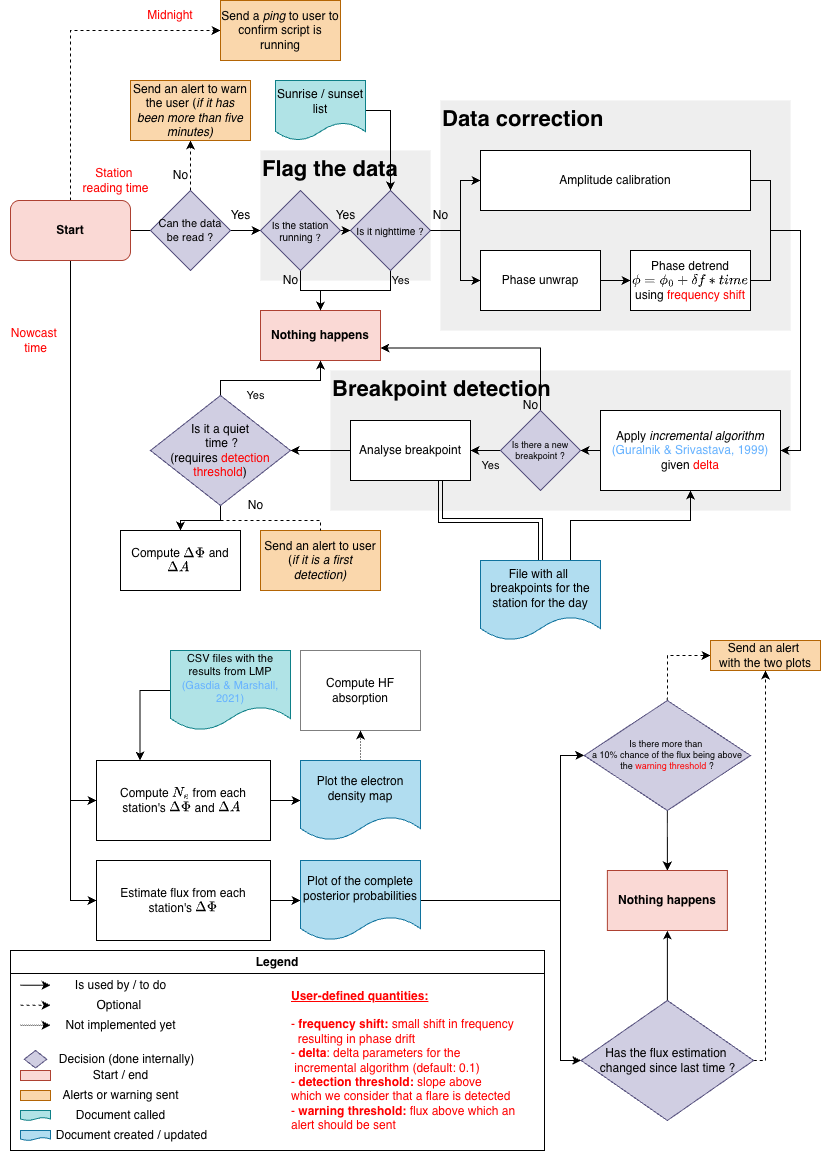
Main step of the code and the interaction between the different objects and files